Blackbox logging: setup and downloading your log
The blackbox is Betaflight's onboard logger: on every flight it records what your stick does, what the flight controller computes from it and what the gyro measures. That is exactly the data fpvrates needs. Here is how to switch it on, get the log off the flash or the SD card and avoid the usual pitfalls.
You need: your quad, a USB data cable and a computer (with an SD card: a card reader).
1. Enable blackbox
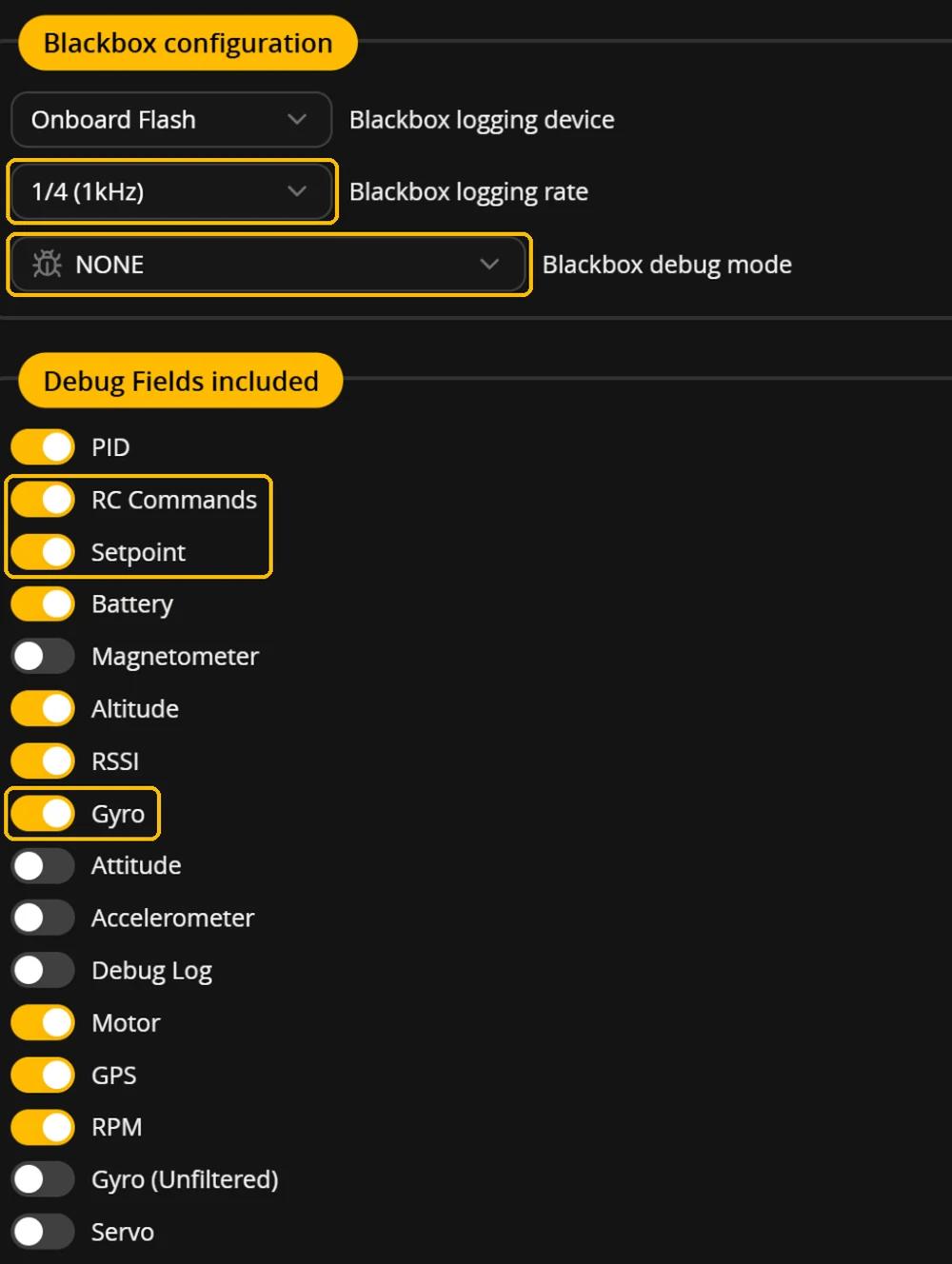
The current Betaflight App no longer has a “BLACKBOX” tick box, and the firmware has no such feature (feature.h, Betaflight 2026.6.2). The Betaflight documentation still describes an old version here. Logging is switched on in the Blackbox tab: set “Blackbox logging device” to “Onboard Flash” or “SD Card” and click “Save and reboot”. If it says “No Logging”, the quad records nothing. On most boards with flash or an SD card the device is already set from the factory. In the CLI that is set blackbox_device = SPIFLASH or set blackbox_device = SDCARD.
2. Choose the log rate
Betaflight does not log every control loop, only a fraction: “The Blackbox sample rate is controlled by the blackbox_sample_rate setting, which defines what fraction of PID loop iterations are logged. Valid values are 1/1, 1/2, 1/4, 1/8, and 1/16. The default is 1/4.” With the usual 8 kHz loop that means, according to the documentation: “1/4 gives approximately 2 kHz logging and 1/8 gives approximately 1 kHz. A rate of 2 kHz is recommended for detailed tuning analysis; 1 kHz is sufficient for general use and reduces storage requirements.”
For rates, 1 kHz is enough: in tests with the logs of a 5-inch quad, 2 kHz and the same logs thinned out to 1 kHz, 500 Hz and 250 Hz gave the same suggested rates, and at 1 kHz twice as much flight time fits on the flash as at 2 kHz. If you also tune PIDs and filters with other tools, stay at 2 kHz. Which fraction gives 1 kHz depends on your PID loop frequency; the app shows the resulting rate in brackets. On an 8 kHz loop that is “1/8 (1kHz)”, on 4 kHz “1/4 (1kHz)”. If there is no option with (1kHz), for example with 3.2 or 6.4 kHz gyros, take the lowest one above it, usually “(1600Hz)”.
3. Which fields are needed
fpvrates needs three field groups that are on by default: RC Commands (your stick), Setpoint (the turn rate Betaflight computes from it) and Gyro (the measured turn rate). You find them in the “Debug Fields included” box. Attitude, Accelerometer, Debug Log and Gyro (Unfiltered) can go off, that saves flash; set the debug mode to NONE unless you need it for something else. The free check reads your settings from the log and tells you if something is missing.
How well do your rates fit your stick? The free check measures it on your blackbox log. No account, the file stays with you.
No log yet? See a real example · Turn on logging, with pictures
For your next flying day
- Betaflight App, Blackbox tab: logging device onboard flash or SD card, logging rate 1 kHz
- RC Commands, Setpoint and Gyro on, then “Save and reboot”
- Fly 3 to 5 packs of normal acro
- Then get the log off the quad and drop it into the free check
4. Fly
“The Blackbox starts recording data as soon as you arm your craft, and stops when you disarm.” If your quad won’t arm, the guide Quad won’t arm: all arming flags explains what each flag means and how to fix it. Fly three to five packs as usual in acro: turns, gaps, a few rolls. Angle or horizon flights alone do not help, because there the quad levels itself and the rotation does not come directly from your stick. After landing: “You should wait a few seconds after disarming your craft to allow the Blackbox to finish saving its data.” Several flights in one file are fine, fpvrates recognizes every log separately.
When the flash is full, nothing more happens: “If you try to start recording a new flight when the dataflash is already full, Blackbox logging will be disabled and nothing will be recorded.” If storage is tight, a logging switch on an AUX channel helps: “Once you've added a mode, Blackbox will only log flight data when the mode is active.”
5. Get the log onto your computer
- Flash chip: quad on USB to the computer, battery off, open the Blackbox tab in the app. The app recommends “Activate Mass Storage Device Mode” (F4, G4, F7, H7 and AT32): the quad reboots and its memory shows up on the computer as a drive you copy the log files from. Afterwards eject it and power the quad off briefly. The other way is “Save flash to file...”; the documentation: “click the "save flash to file..." button. Saving the log can take 2 or 3 minutes.” You get a
.bblfile. The app itself calls this way slow and prone to errors. Then erase the flash: “After downloading the log, be sure to erase the chip to make it ready for reuse by clicking the "erase flash" button.” - SD card: Betaflight creates a new file in the
logsfolder each time you arm (LOG00001.BFL,LOG00002.BFL…;blackbox_io.c, Betaflight 2026.6.2). Pull the card only a few seconds after disarming and read it in a card reader on the computer. Without removing it, use “Activate Mass Storage Device Mode”: according to the app, the SD card then shows up as a drive as well. Drop all files of one round into fpvrates together. - Directly over USB: in Chrome and Edge on a computer, fpvrates can read the flash itself, button “Load the log from your quad (USB)” under the drop zone. The Betaflight App must be disconnected for that, because only one program can hold the USB port.
Whoops and small ready-to-fly quads (BNF)
Many small Betaflight quads have blackbox memory, but not all. fpvrates needs three things: Betaflight 4.3 or newer, a flash chip or an SD card for the blackbox, and flights in acro.
Check it yourself: connect the quad over USB to the Betaflight App and open the Blackbox tab. If the app doesn’t find your quad, see Betaflight not connecting. If it shows “Free space” or “Used space”, there is a flash chip. If it says “Your flight controller does not have a compatible dataflash chip available.”, there is no flash chip; an SD card shows up in its own “Onboard SD card” box. Quicker: the “Load the log from your quad (USB)” button in the free check (Chrome or Edge on a computer) tells you right away if the flash chip is missing.
What the manufacturers state, as of 4 November 2026. This is the memory for the blackbox, not the processor’s program memory, which data sheets often also call “flash”.
| Quad | Blackbox memory according to the manufacturer |
|---|---|
| BetaFPV Meteor65 Pro II, Meteor75 Pro II | Flash 16 MB (Matrix 1S 5IN1 II board) Source: betafpv.com (board page) |
| BetaFPV Air65, Air75 | Flash 16 MB (Air Brushless board) Source: betafpv.com (board page) |
| BetaFPV Meteor65, Meteor65 Pro (2022, ELRS) | Flash 8 MB (F4 1S 5A board) Source: betafpv.com (board page) |
| BetaFPV Pavo20 Pro, Pavo Pico | Flash 16 MB Source: betafpv.com (product page) |
| Happymodel Mobula6 2024 V3 | Flash 16 MB (CrazybeeG473 board) Source: happymodel.cn (board page) |
| Happymodel Mobula8 (UART ELRS V3, 2025) | Flash 16 MB Source: happymodel.cn (product page) |
| Flywoo Firefly 1S Nano Baby V3 | Flash 8 MB (GOKU F405 HD 1S board) Source: flywoo.net (board page) |
| GEPRC TinyGO | Flash, stated as “16Mb” Source: geprc.com (product page) |
| iFlight Defender 16 | Flash 16 MB (Defender 16/20 F411 AIO board) Source: iflight.com (board page) |
| Happymodel Mobula7 1S HD | separate blackbox module with SD card Source: happymodel.cn (product page) |
- External module: the Mobula7 1S HD writes the blackbox through a separate module to its own SD card. Whether its files work in fpvrates directly has not been tested yet.
- Not stated by the manufacturer: for the Happymodel Mobula6 2024 (V1 and V2), Happymodel Mobula7 1S (analog), BetaFPV Meteor85 (2022), BetaFPV Cetus Pro and EMAX Tinyhawk III Plus, the manufacturer pages mention no blackbox memory. Whether it is fitted, the app shows you as described above.
- Firmware too old: for the SPI FrSky version of the Meteor65 (2022), BetaFPV recommends Betaflight 4.2.11; fpvrates needs 4.3 or newer.
- No Betaflight: according to the manufacturer, the BetaFPV Cetus FPV Kit (with brushed motors) flies on LiteSilver, its own firmware based on Silverware. fpvrates does not work with it.
- Small memory: 8 MB at 1 kHz holds about as much flight time as 16 MB at 2 kHz, so roughly three to four minutes. Save the log after one or two packs and erase the flash afterwards.
Pitfalls
- File empty or ground tests only: in the Blackbox tab, “Blackbox logging device” was set to “No Logging”, or a logging switch (mode BLACKBOX in the Modes tab) was off.
- Flash full after one pack: log rate too high or unnecessary fields on; also erase after every download. For scale: on one 5-inch quad, 16 MB at 2 kHz held 189 seconds of flight in one log and 231 seconds in three logs; at 1 kHz about twice as much fits. For three to five packs, save and erase in between; then drop all files of a round into fpvrates together.
- Log without a date (0000-01-01): the flight controller had no clock (no GPS, not connected to the app). fpvrates then asks for the flight day.
- On the phone: the log sits on the flash or the card, you need a computer with USB or a card reader. The analysis itself then runs in the browser, without upload.
What happens with the data and how Betaflight turns the stick position into a turn rate is in the guide Actual Rates explained; how to proceed afterwards, in the guide Setting up Betaflight rates.
Last updated: Nov 11, 2026