Quad too twitchy or too sluggish?
Drop in your blackbox log. fpvrates measures how you really use your sticks and tells you for free whether your rates fit. Want rates that do? The Tuning Pass gives you Actual Rates as a CLI paste: €19 one-time, no subscription.
No log yet? Here’s how to turn it onSee an example
Check my log for freeIs this for me?
Free check, no sign-up · your new rates from €19 one-time, no subscription
FPV guides by topic
Guides with facts from the Betaflight docs, the source code, official sources and manufacturers’ specifications, no off-the-shelf numbers.
Free tools, no account
- Free checkShows you on your blackbox log how you use the stick and whether your rates fit.
- Rates converterConverts between all five rates types (Betaflight, Actual, KISS, Quick, Raceflight), with a curve to compare.
- VTX channelsTable of the analog 5.8 GHz channels from Betaflight: which ones lie in the permitted band (Germany and EU).
- Self testIs it the quad or your stick? Find out whether it’s the rates.
Five things you need.
If something is missing, “Not yet?” tells you how to get there. The free check tells you whether your log works before you pay anything.
- A quad running Betaflight
Betaflight is the software on the flight controller of many FPV quads. fpvrates needs version 4.3 or newer; the free check shows you which one is on yours.
Not yet?
Quads without Betaflight, for example the DJI Avata, don’t work. If your Betaflight is older than 4.3: an update resets the settings, so save them first with “diff all” in the CLI tab.
Betaflight backup with diff allFlash Betaflight firmware - Blackbox logging on board
A flash chip or SD card slot on the flight controller that logs your sticks and gyro. That’s the blackbox.
Not yet?
Without flash and without an SD card the quad records nothing, and fpvrates can’t work with it. The “Load the log from your quad” button tells you right away whether yours has one.
- You fly acro
In acro mode the quad doesn’t level itself, it keeps rotating as long as you hold the stick. Only then can fpvrates see which rotation rates you really need. fpvrates filters out angle and horizon flights.
Not yet?
Then acro is your next step: practice it in an FPV simulator with your radio on the computer, then fly three to five packs of acro with the real quad and come back with the log. What helps against twitchiness until then is in the self test further down.
To the self test ↓ - A computer and a USB data cable
For the “Load the log from your quad” button you need Chrome or Edge on a computer. You can drop a log file into the free check in any browser.
Not yet?
No connection? Some USB cables only charge and carry no data. Try another cable.
- Three to five packs with blackbox on
In the Betaflight App, switch on logging in the Blackbox tab, then fly as usual. The pictures further down show the exact settings.
Not yet?
Logging is still off or you don’t know where? The guide with pictures walks you through it.
Guide with pictures ↓
Get the log from your quad and check it for free.
Easiest via USB: battery off, quad to the computer, disconnect the Betaflight App, press the button. Already have a log file (.bbl or .bfl, from an SD card all .BFL files of one round)? Drop it into the field. Everything happens in your browser, the file stays with you.
Is it the quad or your stick?
“Twitchy” can have several causes. fpvrates solves the ones between your stick and the quad: the rates. Check what happens with yours:
- It shakes, buzzes or wobbles even when you don’t move the sticks.not the rates
That’s not the rates: with the stick centered they ask for no rotation. Check the props first (nicks, cracks, tight), then motors and screws. If that doesn’t help, it’s PIDs and filters; there are tools like FPVtune and PIDtoolbox for that.
- Small stick movements turn into big swings, you keep correcting back and forth.fpvrates helps
Typical of rates that are too sensitive around center, or of a curve that suddenly gets steep in the middle of your normal flying. That’s exactly what fpvrates measures in your log, and it suggests a curve that fits your stick. If it jerks mainly on fast stick moves, feedforward can play a part too.
- Flips and rolls are too slow or too wild for you.fpvrates helps
That’s the rotation rate at full stick, “max” in Betaflight. With the Tuning Pass you tell the result whether the speed is too slow or too fast, and the suggested rates adjust it.
- It jumps up when you add throttle, holding height is hard.free check shows it
That’s the throttle curve and the throttle settings, not the rates. The free check shows your throttle curve and where your throttle sits in flight; there are no suggested settings for it yet.
- You fly in angle mode: the quad levels itself.acro first
Then the self-leveling mostly decides how it reacts, and fpvrates can’t measure what you need on the stick. Learn acro in an FPV simulator (which sims work and how to carry over your rates: guide Rates in the simulator) and come back with an acro log.
Three steps instead of hours of trial and error.
- 01 · Switch on and flyBlackbox on, 3 to 5 packs of acroBlackboxonLog rate1 kHzRC CommandonSetpointonGyroon
In the Betaflight App, switch on logging in the Blackbox tab, then fly acro as usual. The pictures below show the exact settings.
With pictures: switch on logging and get the log ↓ - 02 · Get the logVia USB into your browserbtfl_all.bbl ↓30% of the stick travel unused
Battery off, quad to the computer via USB, click “Load the log from your quad” up top. You see how you use your stick and whether a better curve exists. Your file is not uploaded.
- 03 · Paste and flyNew rates into the Betaflight App
rateprofile 2
set rates_type = ACTUAL
set roll_rc_rate = ••
set roll_srate = ••
set roll_expo = ••
…
save
With the Tuning Pass you get your rates as a text block (CLI block) that you paste into the Betaflight App. Fly 5 to 10 packs, then get the next log, until your rates are dialed in.
With pictures: how to paste the rates ↓
Switch on logging and get the log, with pictures
- The Betaflight App runs for free in the browser: open app.betaflight.com in Chrome or Edge on a computer. For Android there is a separate app.
- Battery off. Plug the quad into the computer with a USB data cable and click “Connect” in the app. If a device is already selected, the button shows its name instead of “Connect”.

- Blackbox logging device: “Onboard Flash” or “SD Card”, whichever your board has. If it says “No Logging”, the recorder is off; the logging rate line only appears once a device is chosen.
- Blackbox logging rate: the option with (1kHz), 1/8 on an 8 kHz loop, 1/4 on 4 kHz (as here). If there is no (1kHz), for example with 3.2 or 6.4 kHz gyros, take the lowest one above it, usually (1600Hz).
- Blackbox debug mode: NONE.
- In the “Debug Fields included” box: RC Commands, Setpoint and Gyro on; from the factory all fields are on. Attitude, Accelerometer, Debug Log and Gyro (Unfiltered) can go off, that saves memory.
- Click “Save and reboot”, then fly 3 to 5 packs of acro as usual.
- Battery off, plug the quad in via USB. Click “Disconnect” in the Betaflight App or close it: only one program at a time can use the USB port.
- Up in the free check, click “Load the log from your quad (USB)” and pick your quad in the browser window. A full 16 MB memory takes about five minutes, the analysis afterwards seconds.
- Other ways: in the Blackbox tab, “Activate Mass Storage Device Mode” (F4, G4, F7, H7 and AT32, or msc in the CLI); then the flash or SD card shows up as a USB drive and you drop the files into the free check above. “Save flash to file...” works too, but according to the app it is slow and prone to errors. With an SD card in a card reader: drop all .BFL files of the round from the card.
- Once everything is saved, click “Erase flash” in the Blackbox tab so there is room for the next flights.
What a result means, in plain English.
A real log from a Mark5 (5-inch quad), roll axis, first round on the previous rates.
96% of the flight was normal flying, no flips or rolls. On the old rates, all of it happened within the first 65% of stick travel.
30% of the stick was barely used. And at the top of the normal-flying range, the same small stick movement gave 9.4× more rotation than at center.
The suggested rates let normal flying run up to 74% of stick travel, leave only 21% unused, and the curve rises more evenly. The rates themselves come with the Tuning Pass.
Free check or Tuning Pass. That's all you need.
No subscription, no credits. The free check shows you whether your rates fit how you fly. The Tuning Pass gives you your new rates (rates that fit how you fly) and measures again until they’re dialed in, for up to five quads with the “5 quads” package.
- ✓ Whether your log works and what’s missing
- ✓ How you use your stick: where fine, where normal, what stays unused
- ✓ Whether your curve gets too steep towards the edge
- ✓ No suggested rates, no account, your log is never uploaded
- ✓ Rates that fit your quad, as a block to paste into the Betaflight App
- ✓ Your choice: a small or a big step, plus faster or calmer flips
- ✓ Measure again as often as you like: pay once, no subscription, no fixed expiry date
- ✓ Valid for one quad, log in on any device via email link
- ✓ Everything in “1 quad”, for up to 5 of your quads
- ✓ Measure again as often as you like: pay once, no subscription, no fixed expiry date
- ✓ Every quad with its own baseline and history
- ✓ More quads? Add 5 any time for €10
Check for free first: the free check shows you whether there’s a better curve for your stick. If there isn’t, you don’t need a pass.
What your result looks like with a pass
A section of the result view, here with the values hidden. With a pass, the dots are your new rates for roll, pitch and yaw. You also get a CLI block to paste into the Betaflight App and the values for your simulator.
You pick the speed at full stick and the step size, and the rates and CLI block update right away.
Pay withCardApple PayGoogle PayPayPal
Prices in euros. If your card or account is in another currency, your bank or the payment provider converts the amount; some banks add a foreign transaction fee. €19 (1 quad) or €29 (5 quads) final price, no further costs, whichever way you pay; add 5 quads to any pass for €10 any time. Card, Apple Pay, Google Pay: the price includes the VAT of your country. PayPal: same price, no VAT charged (German small-business exemption, § 19 UStG). Who processes the payment and issues the invoice is shown on the order page. Digital service, see Terms of use.
Even with a pass, your logs stay with you. The server only keeps your round history, no logs (details in the privacy policy).
Questions before buying? Email hallo@fpvrates.com.
fpvrates deliberately doesn't do PID and filter tuning, that's what FPVtune and PIDtoolbox are for. fpvrates takes care of what the pilot feels on the stick.
Three questions before you pay.
Everything you need to decide is free: setup check, stick zones, histogram and the steepness of your current curve. You pay for the suggested rates with CLI block and for re-measuring over as many rounds as you need. From €19 once, no subscription, no credits. It’s built and run by one FPV pilot, not a company.
Then the free check shows you whether they fit: how much stick travel stays unused and how much steeper your curve gets towards the edge. If everything fits, you don’t need a pass. If not, the suggested rates take the guessing out: fpvrates runs Betaflight’s Actual Rates formula to find the curve that fits your measured stick use. After a few packs on them, you measure again instead of guessing.
Your current rates stay: the CLI block writes to rate profile 3. If you fly a different profile, it stays unchanged and you can switch back any time. The free check tells you whether your log counts before you buy. And fpvrates only suggests a change when it is measurably better, otherwise it says “keep it”. Further rounds are included in the pass.
The new rates into the Betaflight App, with pictures
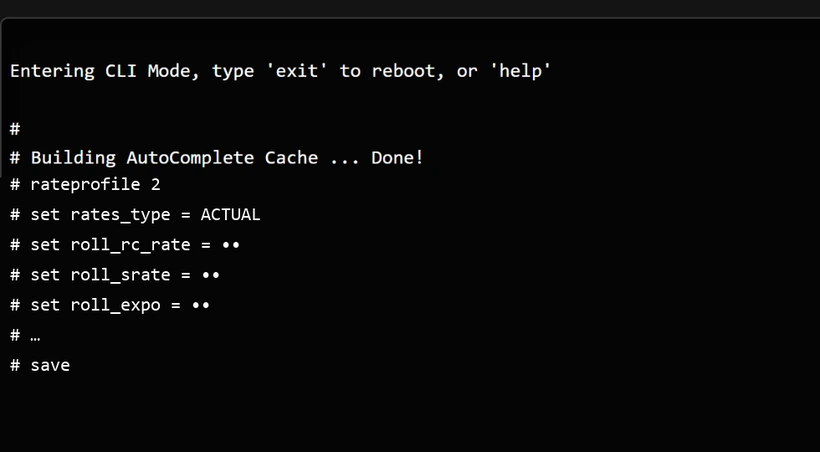
- In the result, click “Copy CLI block”. Battery off, plug the quad in via USB, connect in the Betaflight App, open the CLI tab.
- Paste the block into the input line and press Enter. The CLI counts profiles from 0: “rateprofile 2” in the block is “Rateprofile 3” in the app.
- The last line, save, stores everything and reboots the flight controller.
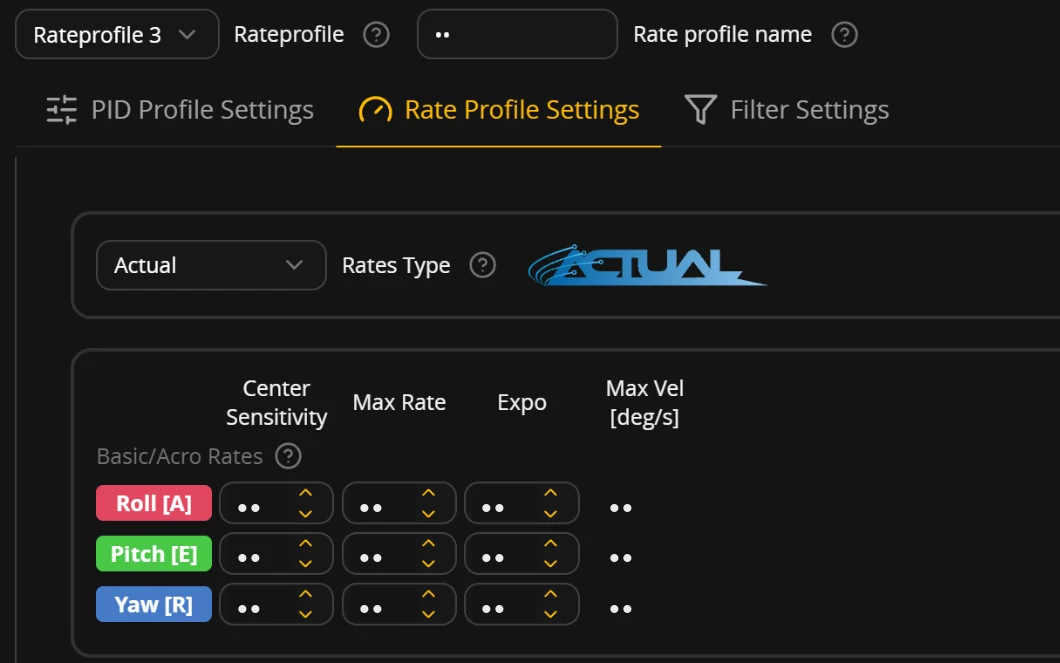
- PID Tuning, Rate Profile Settings: top left it must say “Rateprofile 3”, Rates Type Actual.
- Rate profiles on a switch on your radio? Set the switch to profile 3, otherwise you keep flying your old rates.
- Then fly 5 to 10 packs until the new rates feel familiar. If you like, try them in a simulator first.
- The block only writes to rate profile 3. If you use another profile (from the factory rate profile 1), your previous rates stay there.
- To go back: PID Tuning → Rate Profile Settings, top left, choose your old rate profile. It is active again right away and sticks after “Save”.
- Rate profiles on a switch on your radio? Just switch back.
Rates change how you fly. So everything gets measured again after each step.
A one-off set of rates only fits the pilot you were yesterday. fpvrates measures again after every round, keeps the feel around center stick from your first round and tells you when there is nothing left to gain.
- 01 · FlyThree to five packs of acro
Just your normal flying: turns, trees, orbits, a few rolls. Blackbox on.
- 02 · Drop inGet the log, the rest runs in your browser
fpvrates detects angle, GPS and test flights and filters them out. Every log gets a status.
- 03 · Get used to itFly the new rates for 5 to 10 packs
Only when they feel familiar, drop the next log. New suggested rates only come when they’re measurably worth it, otherwise the answer is: keep them.
- 04 · DoneThe signal that it's dialed in
When nothing relevant moves between two rounds anymore, fpvrates tells you. The Mark5 was done after round 2.
The tech behind it.
For everyone who wants the details: what fpvrates reads from the log, how it calculates and what you can set.
Tested with the logs of a 5-inch quad: 2 kHz and the same logs thinned out to 1 kHz, 500 Hz and 250 Hz gave exactly the same suggested rates. With 1 kHz twice as much flight time fits into the memory as with 2 kHz.
RC Command, Setpoint and Gyro are needed, on by default. fpvrates doesn’t need Gyro (unfiltered), Attitude or Debug. The free check reads your setting and gives you a CLI block that matches your Betaflight version.
Betaflight from 4.3: formula checked against the source code up to 2026.6, real logs so far from 2026.6. Actual Rates directly, Betaflight rates are converted to Actual, the suggested rates come as Actual. KISS, Quick and Raceflight rates aren’t supported yet.
The Actual rates formula comes from the Betaflight source code (rc.c) and is checked against the logged setpoint in every log. If the setpoint deviates, it was angle, horizon or GPS rescue, and the log is filtered out.
Mass storage mode on F4/G4/F7/H7 (“Activate Mass Storage Device Mode” or msc in the CLI), the flash then shows up as a USB drive. From an SD card, drop all .BFL files of one round together.
Five zones from your log, then two families (soft center, direct) run through the Betaflight formula. Round 1 stays the base so nothing goes in circles. A change only comes when it is measurably better.
Five zones on your stick. Measured, not guessed.
Every boundary comes from your own flights. fpvrates looks for the curve that gives the first three zones as much stick travel as possible and keeps the fourth as small as possible.
- Fine 15%
- The slowest rotations around the center. Many of your small corrections happen here. If this travel gets too short, the center feels twitchy.
- Precision 20%
- The peak rate of your short corrections from center stick, counted over all corrections in your log.
- Normal flying 38%
- Turns, trees, orbits: the range where you spend almost all of your rotation time outside of tricks. An even curve matters here.
- Unused 21%
- Stick travel you never use. Every percentage point here is missing from the zones before it.
- Flips & rolls 5%
- Every roll and flip is measured: rotation angle and time at full stick, and what a lower max costs you per roll.
Questions
Why not just use default rates?
Default rates are an average for all pilots. How much stick travel you need for fine corrections, turns and tricks depends on your flying style, your gimbals and your quad. fpvrates measures it on your flights: on the test Mark5, 30% of the stick travel went unused with the previous rates, and the suggested rates bring that down to 21%. The free check shows whether your rates already fit.
How do I set Betaflight rates?
Good rates give you a fine center for small corrections, an even range for turns and gaps and enough travel for rolls and flips, without unused stick travel. Where these boundaries sit for you depends on your flying style. Instead of guessing with a rates calculator, fpvrates measures it with a blackbox log analysis of your real flights and gives you Actual Rates (center, max, expo) as a CLI block for the Betaflight App. After a few packs on them, you measure again until your rates are dialed in.
How many rounds do I need?
As many as it takes until fpvrates says “done”; the Mark5 was done after round 2. For the first round, three to five packs of normal acro on your current rates are enough. After that, fly the new rates for five to ten packs until they feel familiar, and only then drop the next log. fpvrates says “done” when, at your max, no other curve measurably improves steepness and unused stick travel taken together. Then your profile stays as it is, and you stop tweaking.
What about PIDs and filters?
fpvrates deliberately doesn't. Rates are what you feel on the stick, PIDs are what the quad makes of it. For filters and PIDs there are FPVtune and PIDtoolbox.
Is fpvrates a rates converter?
No. A rates converter translates rates you already have into another format, for example Betaflight rates into Actual Rates. fpvrates measures in your blackbox log how you actually use the stick and suggests new rates that fit how you fly. The analysis runs in your browser, the file stays with you. fpvrates is an independent project and not affiliated with other rates tools.
Do I need blackbox logging?
Yes. Every flight controller with a flash chip or an SD card can log. Switch it on in the Betaflight App, Blackbox tab.
Does it work with my whoop or small BNF?
Yes, if it runs Betaflight 4.3 or newer, has blackbox memory (flash chip or SD card) and you fly it in acro. Many whoops have a flash chip with 8 or 16 MB, some have none at all. The quickest check is the USB button in the free check (Chrome or Edge on a computer): if the flash chip is missing, fpvrates tells you right away. What the manufacturers state for Meteor, Air, Pavo, Mobula, Firefly, TinyGO and Defender is in the guide Blackbox logging: setup and downloading your log.
How do I set up blackbox?
A 1 kHz log rate is enough. Tested with logs from a 5-inch quad: 2 kHz and the same logs thinned out to 1 kHz, 500 Hz and 250 Hz gave exactly the same suggested rates, and at 1 kHz twice as much flight time fits into flash as at 2 kHz. You need RC Command, Setpoint and Gyro, which are on by default. fpvrates doesn't need unfiltered gyro, attitude or debug fields. The free check reads your settings from the log and gives you a CLI block that matches your exact Betaflight version. A 16 MB flash holds about three to four minutes of flight at 2 kHz (one 5-inch quad: 189 seconds in one log, 231 seconds in three logs), about twice that at 1 kHz. For three to five packs, save the log in between and erase the flash; then drop all files of a round in together.
What about the throttle curve (thr_mid, thr_hover, thr_expo)?
The free check shows your throttle curve from the log and where your throttle actually sits in flight. Since Betaflight 2025.12 the curve is built around a hover point: thr_mid is the stick position, thr_hover is the throttle at that point, thr_expo flattens the curve there. There are no suggested throttle settings yet, they're in the works.
Which firmware?
Betaflight 4.3 or newer with Actual Rates, formula checked against the source code up to 2026.6. The formula comes from the Betaflight source code and is checked against the logged setpoint values on every log. fpvrates converts logs with Betaflight rates to Actual, checked against real logs from several pilots; the suggested rates come as Actual. KISS, Quick and Raceflight rates aren’t supported yet.
Why is my log not counted?
The most common reasons: KISS, Quick or Raceflight rates (switch to Actual in Betaflight, convert your values, fly again; fpvrates reads Actual and Betaflight rates). Only angle or horizon flown, where the quad levels itself and the rotation does not come directly from your stick. RC Command, Setpoint or Gyro are disabled in the blackbox. Only ground tests, logs shorter than 5 seconds or less than 10 seconds of acro in the log. The free check shows the reason for every log. fpvrates is checked for Betaflight 4.3 or newer (real logs so far from 2026.6); INAV, EmuFlight and older versions are not verified.
Several quads or rate profiles in one file?
Only acro logs with the rates of the newest flight count, logs with other rates are listed as "not counted". If you have several quads on one card, drop each quad's logs separately and give each its own craft name in Betaflight, otherwise there is no clean round history.
What about feedforward and RC smoothing?
fpvrates measures where your stick is and computes the rate with the Betaflight formula from your rates. Feedforward and RC smoothing change how direct the quad feels, but not this curve, so they don’t appear in the suggested rates. Do not change them at the same time as your rates, otherwise you will not know what made the difference.
What happens to my file?
It never leaves your computer. Decoding and analysis run in a Web Worker in your browser. See for yourself: your browser’s network tab shows that no log file is transferred during the analysis. Results stay in your browser. With a Tuning Pass, fpvrates also stores the round history (no logs) on the server so you can continue on any device.
New computer or cleared browser data?
No problem. Click "Log in" at the top and enter the email address of your purchase. You get a login link that works once and for 30 minutes, and your pass is on the new device with your rounds. There is no password. If your pass came from a gift code, just enter the same code again on the new device.
Swapped the flight controller?
Then the log shows a different board, and fpvrates no longer recognizes your quad as the same one. Email hallo@fpvrates.com with the email address of your purchase, the name of the quad from "My pass" and the craft name and board from a log with the new flight controller. I move the binding, once every twelve months per quad, and your round history stays. This usually takes up to 3 working days. If your pass came from a gift code, send the code instead of the email address.
Can I give the Tuning Pass as a gift?
Yes. Choose “Buy as a gift” on the order page. After paying you get a code, on the page and by email. The recipient enters it under Redeem code; only then is the pass bound to their quad. The code has no expiry date, and you can withdraw from the purchase within 14 days.
Where does the idea come from?
The idea isn’t new: a fine center for corrections, an even range for turns and enough travel for flips. At fpvrates, “unused” only means the stick travel between your normal flying and your flips that you hardly ever touch. How fast your flips are at full stick is up to you. What’s new is that fpvrates doesn’t estimate these boundaries but measures them on your flights, round by round.
Who is behind fpvrates?
One FPV pilot, not a company or an agency. I built fpvrates for my own quads; the example on this page is a real log from my own Mark5. Formulas and parameters come from the Betaflight source code, and the analysis runs in your browser. Email me: hallo@fpvrates.com. Provider details: Imprint.
How are the suggested rates chosen?
From your log only, not from an average of other pilots. fpvrates measures your stick zones and uses the Actual Rates formula from Betaflight (source code: rc.c) to work out which curve keeps your fine and precision zones close to your first round, reaches your normal flying rate well before full stick and rises as evenly as possible. The calculation is fixed: same log, same result, no AI. fpvrates only suggests a change when it is measurably better; otherwise it says “keep it”. The example above is a single real log, not proof for every quad; what you get is shown by your own log.
Are the suggested rates guaranteed to be better?
No. They’re suggested rates to test, based on how you actually fly. Sim first, then fly with blackbox, then measure again. The CLI block writes to rate profile 3 in the Betaflight App ("rateprofile 2" in the CLI, which counts from 0), your current profile stays intact if you use a different one. A small fine adjustment to your own taste is always possible and normal: your flying style changes over time.